Safe sender
In Outlook
For anyone with Outlook at work. Do this once per address.
You need both addresses: nieuwsbrief@inklaretaal.nl and account@inklaretaal.nl.
- New Outlook, Outlook on the web and Outlook.com: select Settings > Mail > Junk email. Scroll down to Senders and select the Safe senders and domains tab. Select + Add safe sender and enter
nieuwsbrief@inklaretaal.nl. Select OK, and then select Save. Do the same foraccount@inklaretaal.nl.On your screen: Settings › Mail › Junk email › Safe senders and domains › + Add safe sender
- Classic Outlook: click Home. In the Delete group, click Junk (it might say Block), and then click Junk Email Options. On the Safe Senders tab, click Add. Enter the address and click OK. Repeat for the second address.
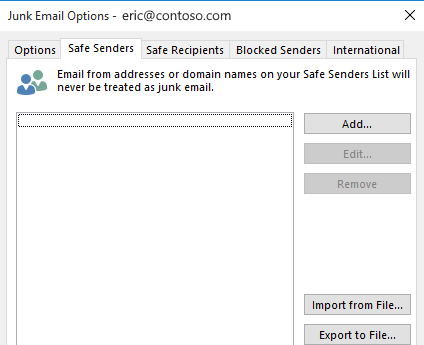
Picture: Microsoft, CC BY 4.0, cropped - Is a mail from us already in your Junk Email folder? In new Outlook, select it and then Report > Not junk. The message is moved to your inbox, and the sender is added to your Safe Senders list. In classic Outlook, select Junk > Not Junk.
On your screen: Junk Email › Report › Not junk
Does it work?
Open the list of safe senders again, in the same place as in step 1 or step 2. Are both addresses in it? Then it works. The next letter comes on Tuesday morning in your Inbox. Is it still in Junk Email? Then do step 3.
Source: Microsoft Support (1, 2, 3)
Still stuck? Email info@inklaretaal.nl and we will help.